Test the flows your users actually run
Ovi turns prioritized QA scenarios into browser checks, navigates a real Chromium session, captures evidence, and reports the result back to your workflow.
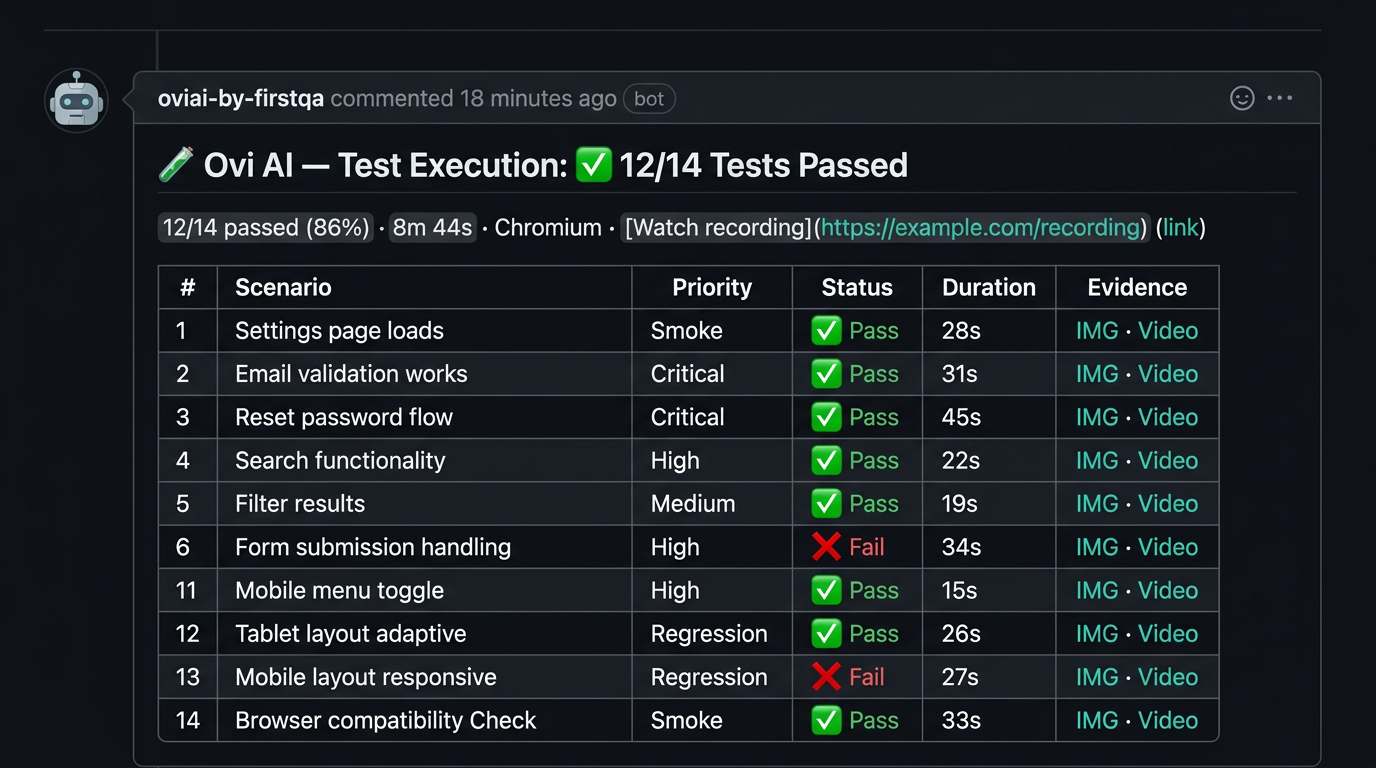
From test recipe to browser evidence
Unit and integration tests are essential, but they do not prove that a user can complete the whole flow in a real browser. FirstQA executes selected scenarios against a configured staging environment and records what happened.
The output is more than pass or fail: it includes the scenario, expected behavior, result, and evidence your team can inspect.
- Real cloud Chromium execution through Browserbase
- Screenshots captured during the scenario
- Session recording and failure context
- Pass, fail, and partial results
- Evidence-backed release guidance
Use browser testing where it fits your workflow
For FirstQA-hosted GitHub runs, comment /qa testrun on a pull request and configure a staging URL and test account. For MCP workflows, your coding agent can run the recipe against the local app or a URL you provide.
Teams choose which scenarios to run and remain responsible for test data, permissions, and release policy.
- PR-triggered managed browser runs
- Local or remote runs through MCP
- Dedicated test authentication support
- Browser evidence attached to the QA result
See FirstQA in action
Frequently asked questions
Does FirstQA test in a real browser?
Yes. FirstQA-hosted runs use a real cloud Chromium browser through Browserbase. The browser agent navigates the app, executes the selected scenarios, and captures evidence.
What does browser testing need?
Hosted runs need a configured staging URL and, when required, a dedicated test account. MCP runs can use the local app or a URL supplied by your coding agent.
How long do browser test runs take?
The current documentation estimates roughly 5 to 15 minutes depending on the number of scenarios and the environment.
Bring Ovi onto your team
Start with a real analysis, run the free quality report, or apply for invite-based early access.
See a real analysis Apply for early access